Eight steps — you can think of the whole process as "a secretariat preparing a briefing response for an executive":
| Step | What the System Does | Everyday Analogy |
|---|---|---|
| ❶ Receive the question | The system receives the question the user typed in | The executive assigns a task: "Find out about X for me and give me a written response" |
| ❷ Embed & understand | First "clean up" the question to make it easier to search — rewriting vague phrasing, adding synonymous ways of saying it, breaking a complex question into several smaller ones — then convert it into a string of numbers (a vector), so the computer can "understand the meaning" and compare it against the database | The secretary first makes sure they understand the assigned question clearly — clarifying anything vague, rephrasing it into the standard terms used in the filing system — before they can go pull the right files |
| ❸ Retrieve | Take that string of numbers and search the database for the most relevant passages. In a real system, this step is a "wide-to-narrow funnel": first search two channels at once (meaning-based vector search + literal keyword search), then filter out anything that shouldn't appear (like content you don't have permission to see, or content that's outdated), and finally use a more careful model to re-rank the remaining candidates (called "reranking"), keeping only the most relevant passages | The secretary goes to the archive room to pull files: searching several channels at once, excluding classified files they aren't cleared to see and superseded old versions, then reading each remaining document closely and keeping only the pages that actually answer the question |
| ❹ Augment (assemble prompt) | Assemble "the retrieved material" + "your original question" + "the system's behavior instructions" into one complete piece of text, ready to hand to the model. The name "Augmented" comes from RAG's full name, Retrieval-Augmented Generation — using the retrieved material to augment your original question is exactly what this step does | The secretary puts the retrieved documents, the executive's original question, and the instruction "write from the material, don't improvise" all into one working folder |
| ❺ Generate | The large language model reads this folder and writes out the answer word by word | The department's designated writer takes the folder and drafts the response based on the material inside |
| ❻ Guardrails | The system checks whether the answer has any problems (like leaking something it shouldn't, wrong formatting, or obvious fabrication) — this check mechanism is standardly called "Guardrails" in the industry. More sophisticated systems also have the model "check the answer against the retrieved material again itself," and revise if it finds a discrepancy (this self-check step is called reflection) | The drafter first checks their own draft against the original documents, then the department head reviews and signs off before it can be submitted upward |
| ❼ Respond with citations | Return the answer to you along with a citation of "which document and which passage this statement is based on" | The response submitted to the executive notes "based on Article X of Document Y," so the executive can pull the original document to verify at any time |
| ❽ Log | The system records this round of Q&A — usually keeping two copies: a log (a persistent record for later troubleshooting, auditing, and statistics) and conversation history (kept as context for your next question — the two records serve different purposes and are often stored in different places) | The office logs it for the record: who assigned it, when it was handled, which files were pulled, and what the response was — and at the same time files this exchange into that executive's correspondence folder, so it can easily be referenced the next time they assign something |
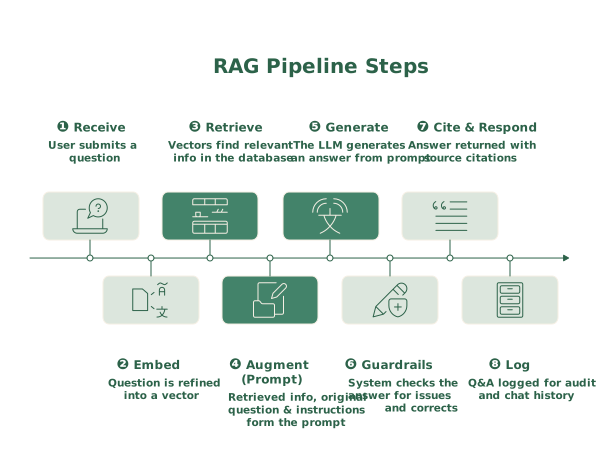
A note: what people usually call "RAG" is really just the middle section of this table. The RAG defined in papers and tutorials is, at its core, just three steps: ❸ Retrieve → ❹ Augment → ❺ Generate — which happen to match the three words in RAG's full name (Retrieval, Augmented, Generation); ❷ converting to a vector is a prerequisite for retrieval, so it's generally counted in too. The remaining steps aren't part of RAG itself: ❶ and ❼ are the "receive-and-respond" that any online service has, ❽ is operational record-keeping, and ❻ is a hardening measure for production systems. So when someone says "we've built RAG," they usually mean just that middle section; this table describes the complete pipeline you get once you put RAG into a real production system and run it.
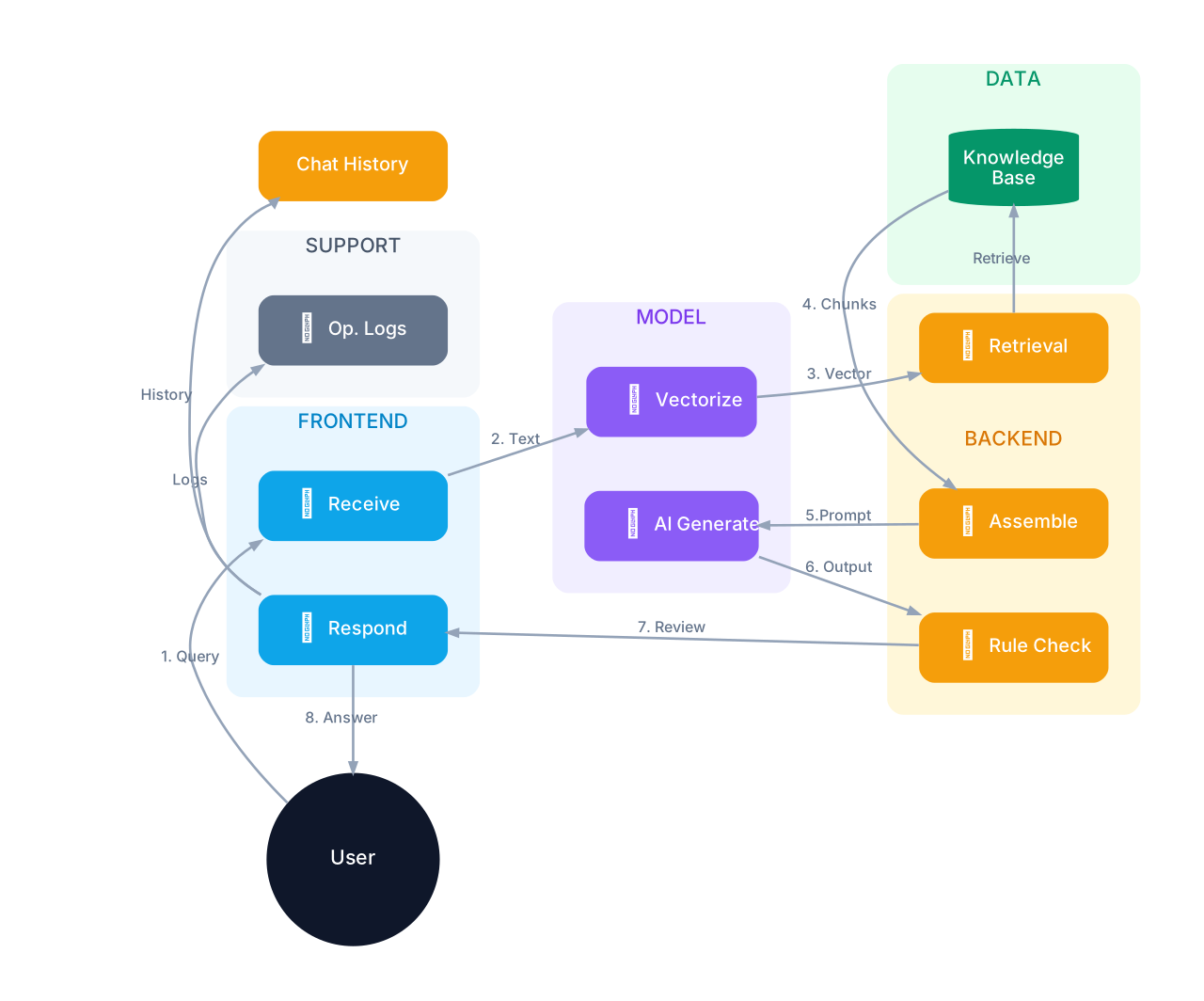
Which "department" handles each of these eight steps:
| Department | Steps It Handles | What It Is |
|---|---|---|
| Frontend | ❶ Receives your question, ❼ presents the response to you | The chat window where you type your question and see the answer |
| Orchestration / Backend | Directs the order and gating of all eight steps; personally handles ❹ assembly and the rule-checking in ❻ | An invisible coordinating program — it doesn't "answer the question" itself, but decides where to get material from, how to assemble it, and whether to hold the output for review after generation. Chapter Three will expand on an important rule: it's the only "active initiator" in the entire system |
| Model | ❷ Converts text into vectors (embedding service), ❺ generates the answer (LLM service) | The AI that actually does "understanding meaning" and "writing the answer." Both services can be deployed in two forms: cloud-hosted (i.e., MaaS, Model-as-a-Service — the model runs on the provider's cloud and is called over the network, so you don't need to buy your own hardware) or self-hosted (you run it on your own machines, so data never leaves your company's boundary). Which form to choose is a key decision covered in the compliance discussion in Chapter Five |
| Data | ❸ The place retrieval searches | Vector database (stores the vectors converted from the material, and usually also a plaintext copy of the original — once you find the vector, you can pull up the original text) + document / object storage (where the original PDF, Word files themselves are kept) |
| Support | ❽ Where the "log" copy of the record goes (the other copy, "conversation history," is kept by the backend for the next round) | Logging / observability systems — every "who asked what, what was retrieved, what was answered" gets a persistent copy for troubleshooting and auditing. Chapter Five covers this: it's the corner of compliance most easily overlooked |
Offline Indexing: The Everyday Prep Work Outside the Eight Steps — Where Does the Material Retrieval Searches Come From?
The eight steps above all describe what happens "after the executive assigns the task" — but one precondition got skipped: who put the vectors into that vector database that ❸ retrieval searches, and when? The answer is a separate preparation pipeline that runs continuously outside the eight steps, called offline indexing ("offline" meaning: it doesn't happen live while answering a question, but is done ahead of time):
Document → Parsing (reading formats like PDF and Word into plain text) → Chunking (cutting long documents into segments, say a few hundred characters each, because the model can't read too much at once and precise retrieval gets harder with long chunks) → Embedding (converting each small chunk into a numeric vector) → Storing it in the vector database.
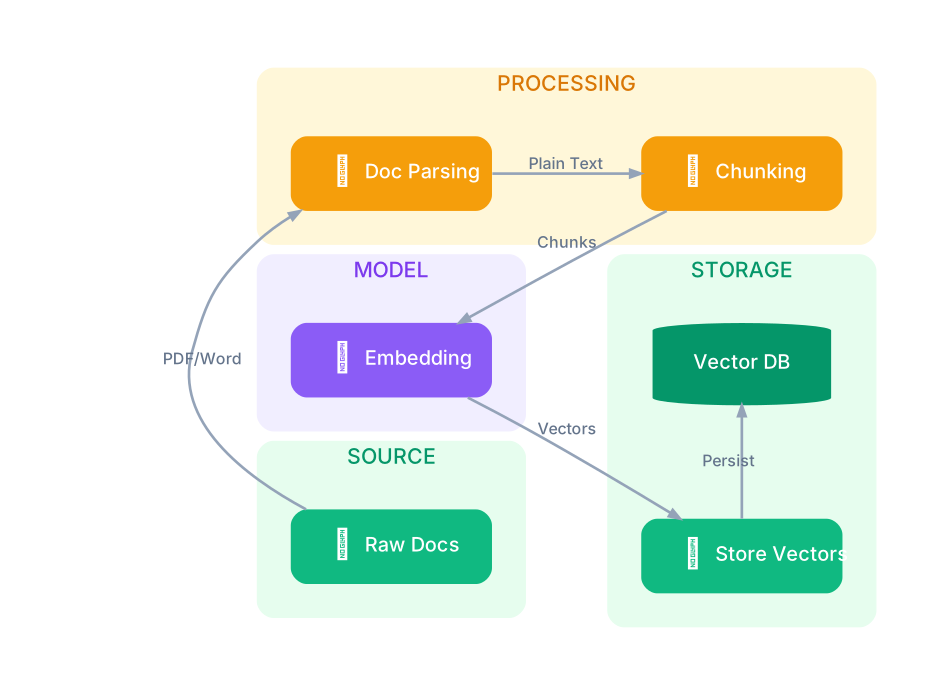
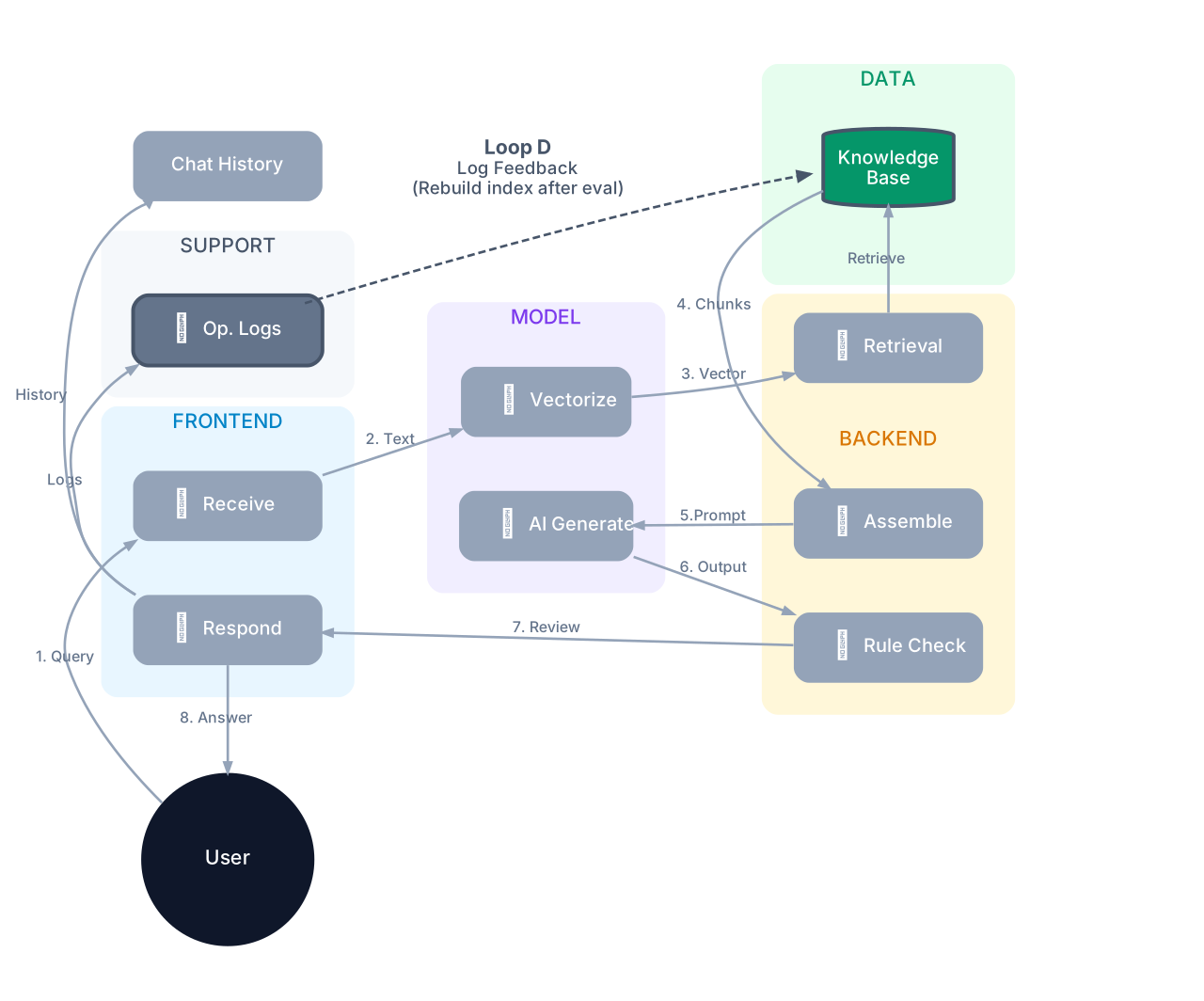
This step is like the archive room routinely filing, cataloging, and organizing all documents by topic ahead of time, so they can be pulled on demand later — without doing this first, every time the executive assigns a task, you'd have to re-search the entire company's documents from scratch on the spot, which would be unbearably slow. It's also not a "do it once and done" job: new and revised documents, or adjustments to retrieval strategy, all trigger index updates or rebuilds — Loop D below covers what drives this.
Are These Eight Steps a Straight Line? Four Loops
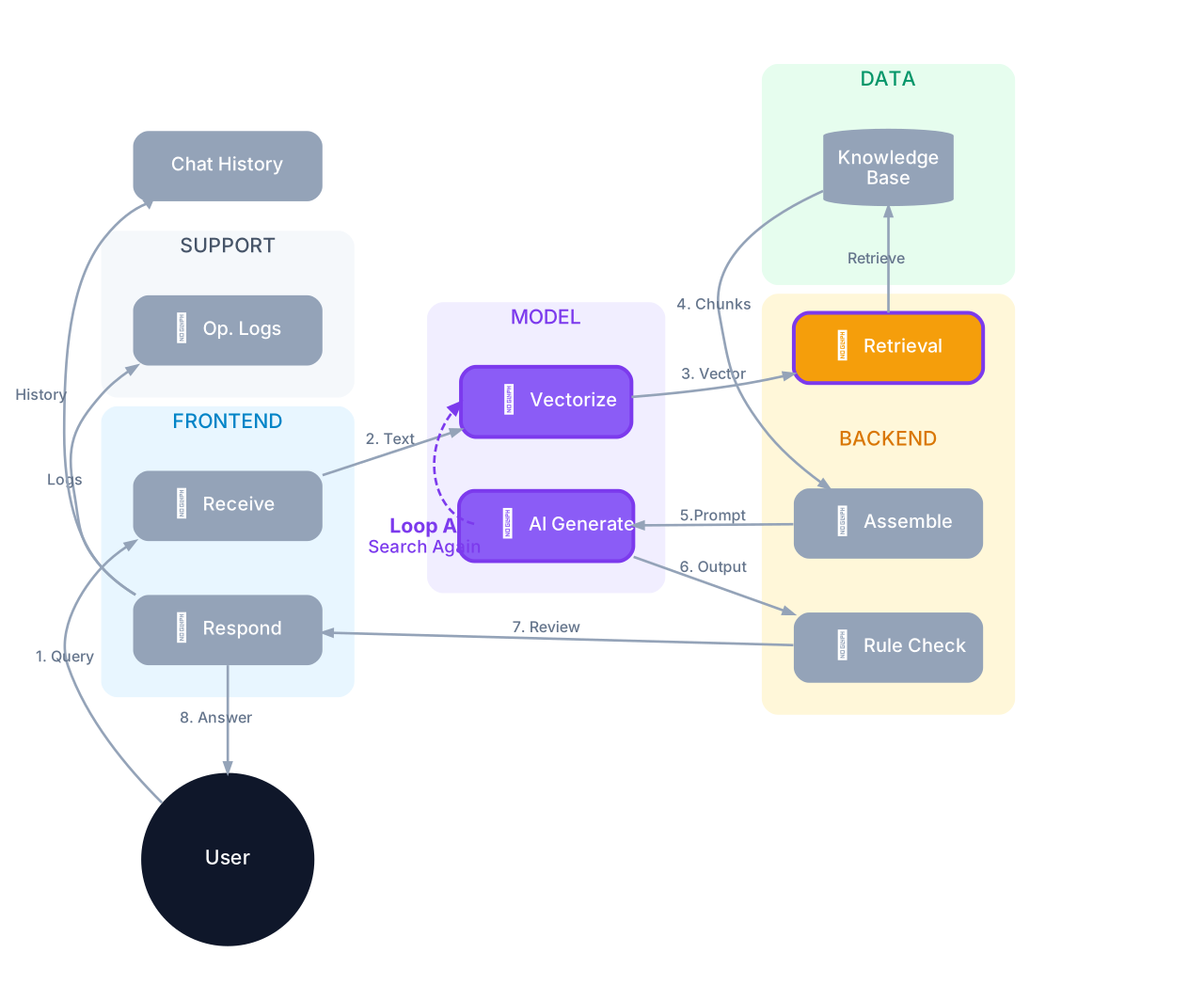
Looking at a single smooth Q&A exchange, the eight steps really are a straight line from start to finish (the output of one step is the raw material for the next, and the order can't be scrambled). But a real system hangs a few "loop-backs" off this main trunk, which kick in and send things back under certain conditions:
- Loop A · Search Again: Before generating an answer, the model discovers "the retrieved material isn't enough to answer this question," so it rephrases and goes back to ❷❸ to retrieve another round — possibly repeating several times until the material is sufficient. The key point: how many rounds it searches isn't hard-coded in advance — the model decides on the spot — this is exactly the "agentic" way of working that Chapter Four covers later.
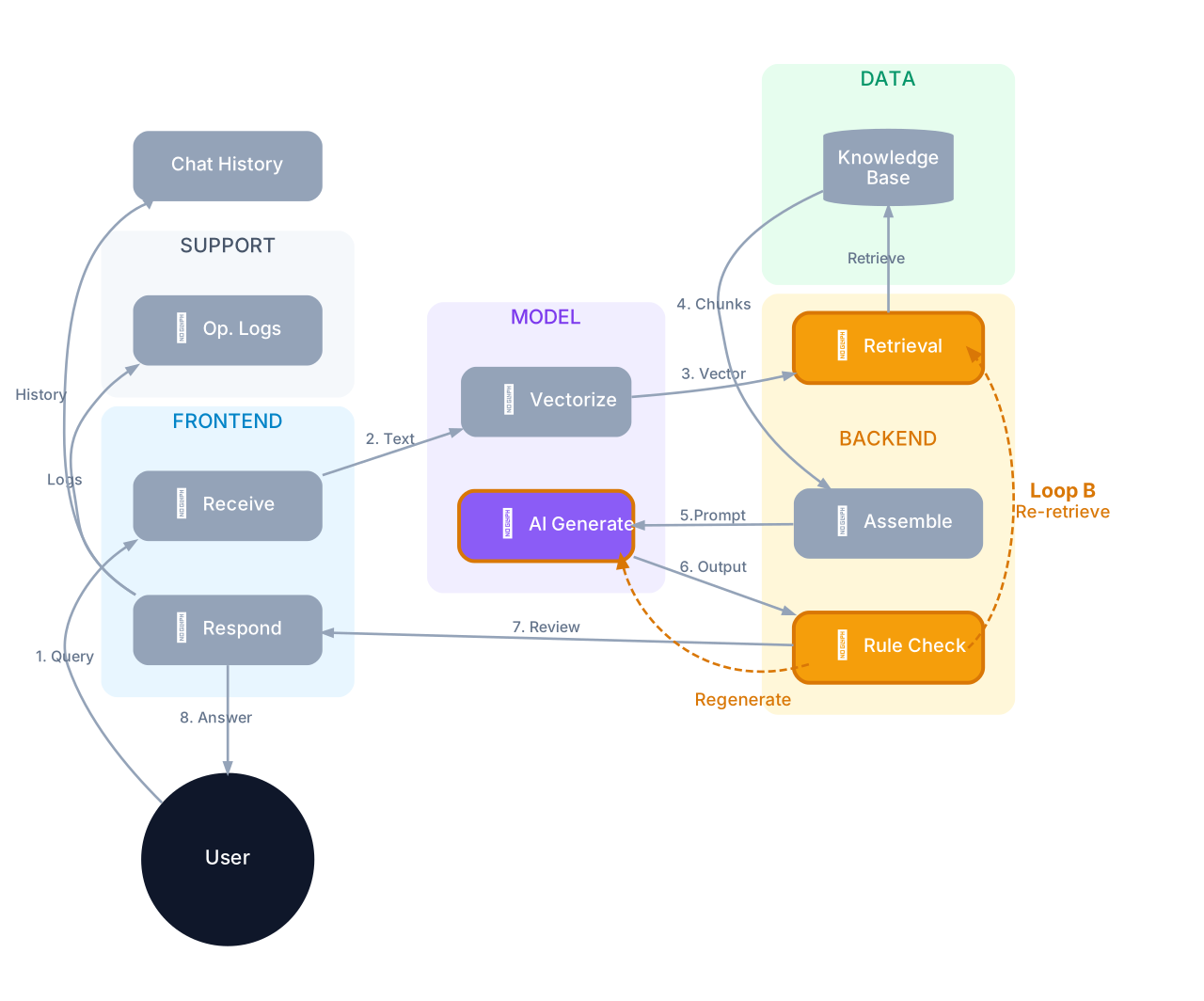
- Loop B · Guardrail Rejection: When the ❻ check fails, the system falls back to ❺ to regenerate, or back to ❸ to re-retrieve, according to pre-defined rules. Unlike Loop A, here "under what conditions to fall back, to where, and how many times at most" are all rules engineers hard-coded in advance — the model has no say in the decision.
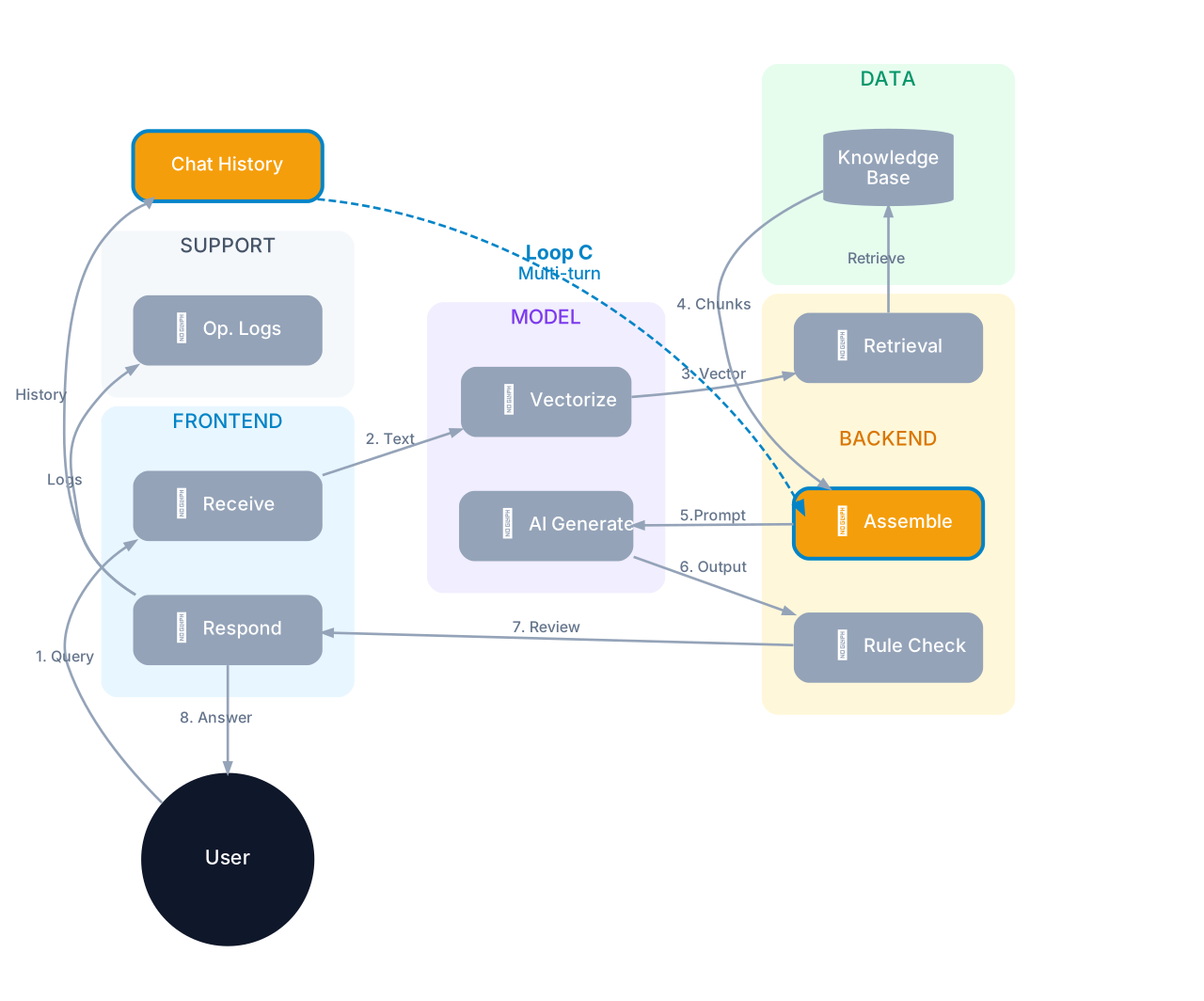
- Loop C · Multi-Turn Conversation: The model itself has no memory — once a round of Q&A ends, it "remembers" nothing. The reason you can follow up with "what about the second one" is that ❽ saves the question and answer into conversation history every round (note: this is the "conversation history" copy of the two records ❽ keeps, not the log); when you send a new question, the working folder ❹ assembles includes this history alongside the new question and newly retrieved material, and the model rereads all of it on the spot to figure out what "the second one" refers to. This loop in one sentence: the previous round's output becomes part of the next round's input.
- Loop D · Logs Feeding Back: The logs ❽ accumulates are periodically handed to an evaluation system for analysis (which kinds of questions get answered poorly, and whether it was retrieval or generation that got it wrong); engineers use the findings to adjust chunking methods and retrieval strategy, then rebuild the offline index. This loop cycles on a scale of days or weeks, and the decisions in this loop are made by people, not the system.
Further Reading: RAG's "Generational" Classification
RAG has kept evolving since it first appeared, and the industry conventionally divides it into three generations.
The first generation is called Naive RAG: the eight steps run straight through, and each step does only the simplest possible version. The second generation is called Advanced RAG1: the skeleton stays the same, but every step gets more refined — ❷ adds rewriting and decomposition, ❸ becomes the wide-to-narrow funnel, ❻ adds reflection and correction, plus rule-triggered retries like Loop B. The "real system" described in this chapter belongs to this generation. The third generation is called Agentic RAG2, which Chapter Four covers in depth.
The dividing line between the three generations isn't whether loops exist, but who decides the loop. In the first two generations, the looping rules are written into the code in advance by engineers, and the system just executes them; Agentic RAG instead hands "whether to search again, and how" to the model to judge on the fly — Loop A is exactly this case. As for Loops B, C, and D, in the first two generations their decision-making power likewise stays with rules and people: B is triggered by preset rules (the rules can ask the model to act as a "scorer" internally — for instance, having the model rate the quality of retrieved results — but which path to take after scoring is still decided by the rules), C attaches history in a fixed way, and D is driven by engineers — so their presence doesn't change the generational classification. Conversely, the moment a loop's decision-making is genuinely handed over to the model — for example, having the model judge for itself whether the answer is well-grounded and whether to re-retrieve or rewrite (the industry does have approaches like this, such as Self-RAG3) — by the same standard, that loop becomes agentic too. In short: the three generations use the same components; what changes is who's in command.
-
Gao et al., Retrieval-Augmented Generation for Large Language Models: A Survey, 2023 — the earliest source for the "Naive RAG / Advanced RAG / Modular RAG" three-generation classification. The original paper calls the third generation "Modular RAG"; this section swaps in the more fitting and more commonly used term "Agentic RAG," sourced in the next footnote. https://arxiv.org/abs/2312.10997 ↩
-
Singh et al., Agentic Retrieval-Augmented Generation: A Survey on Agentic RAG, 2025. https://arxiv.org/abs/2501.09136 ↩
-
Asai et al., Self-RAG: Learning to Retrieve, Generate, and Critique through Self-Reflection, ICLR 2024 (oral, top 1% of submissions). https://arxiv.org/abs/2310.11511 ↩